Central Controller · central control for air compressors
One controller for your whole compressor fleet
Keeps pressure in a narrow band, runs only the machines the demand needs, and lets machines of different brands work as one fleet.
Runs mixed fleets:Atlas CopcoIngersoll RandKobelcoHitachiKaeserFushengHanshinChinese brandsand many others
What happens when machines run on their own?
Swinging pressure, high setpoint
Each machine follows its own pressure switch. The bands have to overlap, so the shared pressure usually sits higher than the plant needs.
Too much unloaded running
Several machines run at once, each loaded only part of the time. Unloaded machines still use power.
Needless starts
The machines do not coordinate: one has just stopped when another starts.
Faults nobody sees
You find out when the pressure has already dropped. Running hours drift apart, so service cannot be grouped.
What Central Controller does
Lower setpoint thanks to a narrow band
The whole fleet follows one narrow pressure band. There is no need to set pressure high as a safety margin, so the setpoint can come down. Rule of thumb: 1 bar less working pressure saves about 7 % of compressor energy.
Choose several pressure levels by shift, day off or weekly schedule.
Strongest on: fleets running a wide band at a high setpoint.
Just enough machines, less unloaded running, fewer starts
It estimates air demand from how fast pressure rises and falls, then picks a combination of machines that is just enough. VSD machines trim the changes, and surplus machines rest at the right moment.
Strongest on: fleets with many fixed-speed machines.
Equal running hours, automatic backup on a fault
Hours are shared evenly between machines of the same size, so service can be grouped. If a machine faults or loses contact, another takes over and the warning appears on screen at once.
Useful on every fleet, even all-VSD ones.
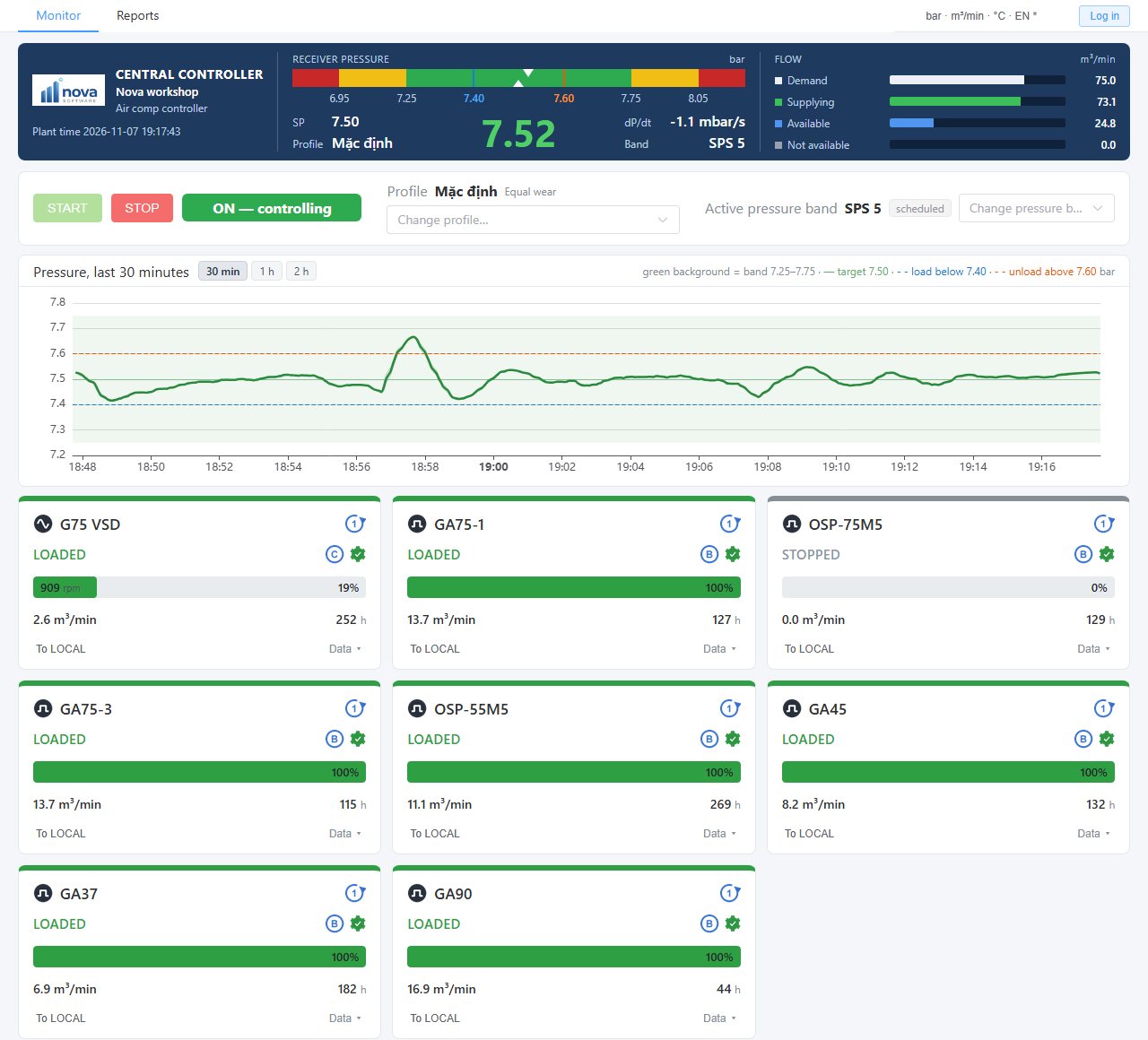
One screen for the whole fleet
Pressure, air demand and the state of each machine, in a browser on a PC on the plant network. The interface comes in English and Vietnamese, with selectable display units.
This is the real screen of the system.
Already have SCADA? Bring the whole fleet in over one Modbus link
Pressure, band, air demand, state, running hours and warnings of every machine, other brands included, in one place. No wiring to each machine and no separate driver for each brand. For more depth, each machine has its own address with further data, depending on the machine.
Read-only by default. To control from SCADA, the plant turns on write commands and limits them by IP address.
Included from Standard: Modbus TCP or Modbus RTU.
3 run modes, to suit how your plant operates
Equal wear
Shares running hours between machines of the same size so they wear evenly and service can be grouped. This is the default.
Energy saving
Among the combinations that supply enough air, picks the one with the lowest power based on each machine's data. Suits fleets with several machine sizes.
Fixed sequence
Machines run in the order the plant sets: more air calls the next machine, surplus rests them in reverse order. Machines that are not ready are skipped.
Save several profiles, each with its own mode and machine roles, and switch on screen. You can also choose to favour fewer starts or lower energy.
Straight talk about energy saving
We do not promise one % figure for every plant. Fleets with many fixed-speed machines and a wide band usually have plenty to save. On an all-VSD fleet that already runs well the saving is usually small; the main value there is stable pressure, central monitoring and equal running hours.
That is why we measure your fleet first, then tell you how much.
Reports and the touch screen at the cabinet
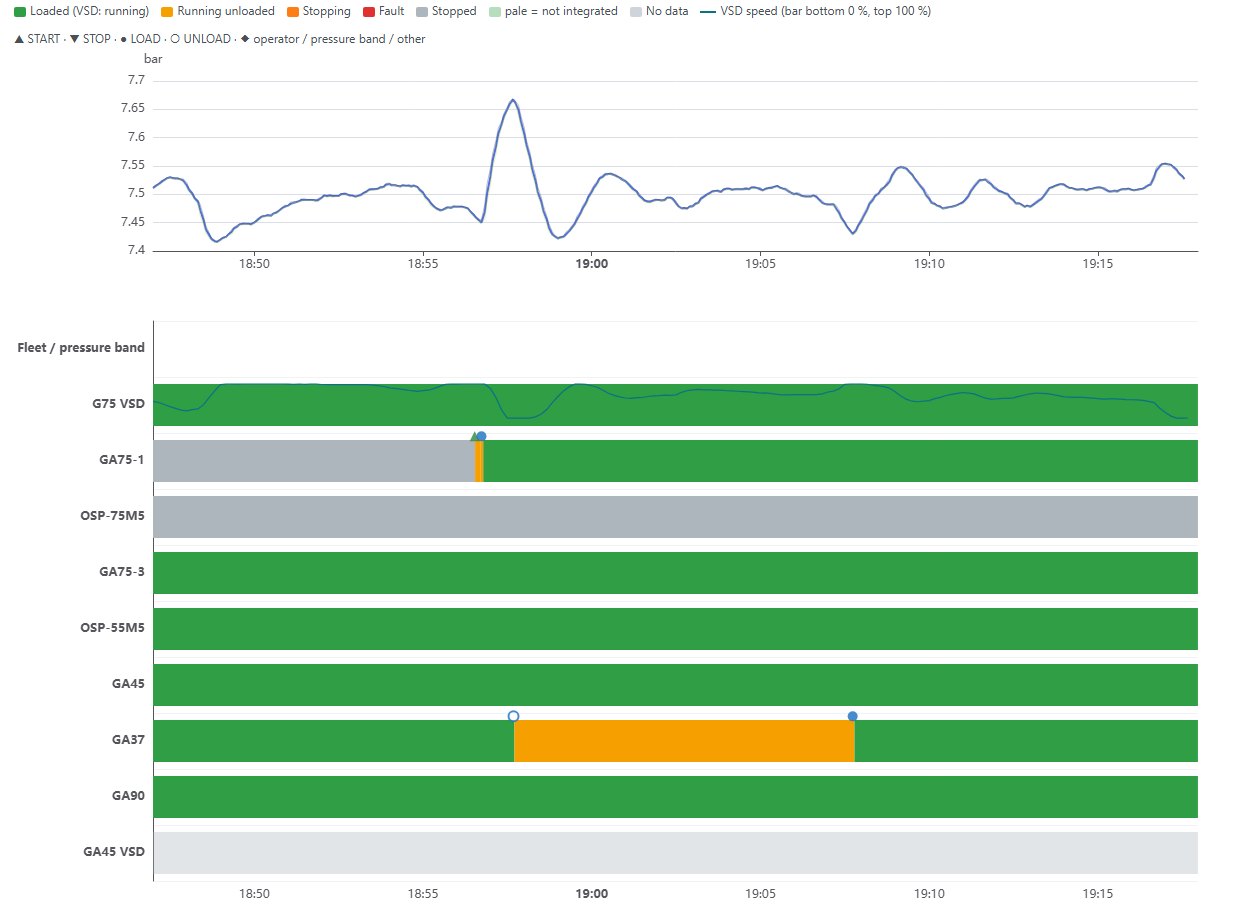
Web reports: pressure history, the state of each machine over time, running hours, loaded hours, number of starts, energy and air (estimated from machine data). CSV export opens in Excel.
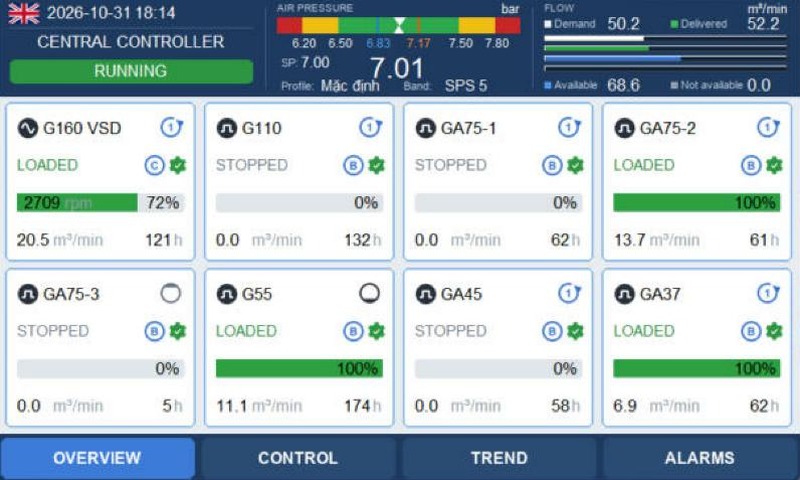
Weintek touch screen at the cabinet: fleet overview, control, trends, alarms. English and Vietnamese.
Safe when something goes wrong
Controller down, the plant still has air
If the connection is lost or the central controller is off, each machine goes back to its own pressure band, as before installation.
Handles sudden power cuts
A power cut at the cabinet does not damage data; optionally it resumes control when power returns.
Machine protections stay as they are
Each machine's protections and fault reporting keep working as before.
Control needs no internet
The controller runs on the plant network with no PC running all the time. Internet is only for remote monitoring, if you buy it.
Monitor compressors and other equipment remotely
Less travel time and cost
Plants are often far from the office, in another province, hours or half a day away. With the cloud you see your fleets anywhere, anytime with internet, on a PC or phone.
The cloud only receives data and sends no commands to machines.
Optional add-on.
Choose your edition: Lite, Standard, Pro
All three share the same control algorithm and all 3 run modes, so they hold pressure and pick machines the same way. They differ in machine count, monitoring and reports.
Lite
4 compressors
Small fleets, operated on the touch screen at the cabinet.
Standard
8 compressors
Adds web monitoring, reports, 2 years of history and SCADA connection.
Pro
31 compressors
Everything in Standard for large fleets, with a 10" touch screen.
| Lite | Standard | Pro | |
|---|---|---|---|
| Maximum compressors | 4 | 8 | 31 |
| Touch screen at the cabinet | 7" | 7" | 10" |
| Narrow band, machine combinations, automatic backup on a fault | ✓ | ✓ | ✓ |
| 3 run modes: equal wear, energy saving, fixed sequence | ✓ | ✓ | ✓ |
| Pressure schedule by shift, week, holidays | ✓ | ✓ | ✓ |
| Auto-restart after a power cut (optional) | ✓ | ✓ | ✓ |
| Web monitoring on the plant network | – | ✓ | ✓ |
| Charts, reports, event log | – | ✓ | ✓ |
| 2 years of history, CSV export for Excel | – | ✓ | ✓ |
| Plant SCADA connection (Modbus TCP, RTU) | – | ✓ | ✓ |
| Technical diagnostics tools | – | ✓ | ✓ |
| Mixed-brand fleets | ✓ | ✓ | ✓ |
| Remote monitoring (cloud) | add-on | add-on | add-on |
One unit per air network; a plant with two separate air networks needs two. Depending on the machine, an extra interface device may be needed; see connection requirements. Pricing depends on the fleet; contact us for a quote after the assessment.
Will it work with your machines? A 1-minute check
Any brand will do, as long as the machine's controller or electrical cabinet has these signals:
The machine accepts remote commands
- Remote start / stop
- Remote load / unload
- Control mode select (local / remote)
The machine reports its state
- Running
- Loaded
- General fault, recommended
Machines with a compatible communication port, such as Elektronikon MK4 and MK5 controllers, do not need these signals wired. VSD machines of other brands also need a way to set speed; we check this during the assessment.
Measure first, quote after
- Free pre-checkSend us the number of machines, brands, and a photo of the controller or wiring diagram. We tell you whether the machines can be used.
- 1–2 week fleet assessment, support feeOn-site measurement of pressure and machine states, read-only, with no effect on control. The support fee is told up front and deducted from the order if you buy.
- Key results in your plant's own numbersActual pressure band, unloaded hours, number of starts; what can be improved and what cannot.
- Quote, installation, handoverA detailed plan for your fleet, commissioning with your plant's technical team, training and support after installation.
Frequently asked questions
Does installing it affect the compressors?
Not at all. Central Controller only sends commands through the existing communication port and remote control inputs, and does not touch the program of the compressor's controller. The machine is still run and protected by its own controller, as before. If needed, just disconnect it and the machine runs as before.
My fleet is all VSD. Do I need it?
The energy saving is usually small. The main benefits are stable pressure, machines not fighting over load, central monitoring and reports, equal running hours and automatic backup on a fault. The assessment gives you actual figures.
What if the central controller fails?
Each machine goes back to its own pressure band and the plant still has air. Once repaired, the controller takes the fleet back.
Tell us about your fleet
Send us the number of machines, brands and working pressure, plus a photo of the controller if you have one. We do the pre-check free of charge and tell you the fee before going on site.
Phone: +84 903 07 11 00 · Email: hao.nguyen@cdtnova.com.vn
A compressor service company? We supply the controller, technical training and installation support so you have one more solution for your customers, along with remote monitoring of many plants. Contact us to talk about working together.
Brand names and trademarks belong to their respective owners and are used only to describe compatibility. Central Controller is an independent product of Nova Mechatronics, not affiliated with the brands above. Compressor pictures are illustrations.